

A VS Code Extension for the Agent Era — What Developers Look At Now
Once writing code got cheap, a developer's time moved to judging and approving. Here is why those jobs cannot live outside the editor, and the choices behind the CollabOps VS Code extension.

The CollabOps extension for VS Code is on the Marketplace. It puts issues, change requests, repositories and documents inside the editor.
Before the feature list, one thing is worth saying: what it is worth to have your work items inside the editor has changed over the last two years. It used to be a convenience. It is not anymore.
When code gets cheap, where does a developer's time go?
As covered in When coding agents write all the code, where does the bottleneck go?, what collapsed is the cost of writing code. On our own team, change requests went from a few a week to dozens. Nobody suddenly got ten times more diligent — the friction in one stage disappeared.
So how does a developer's day get rebuilt? Three things fill the space typing used to occupy.
- Deciding what to work on — which issue, with what context
- Judging what came back — the diff, the CI results, the blast radius
- Approving — merge, deploy, roll back
All three used to live outside the editor. Issues in the browser, review requests in the browser, build results in the browser.
When typing filled most of the day, that round trip was an occasional interruption. Now the round trip is the job, and what the extension is worth changed with it. It used to save you a few annoyances a day. Now it moves the whole enlarged share of judging and approving back to where the work happens.
The editor is no longer a private workspace
There is a second change, and it matters more. Agents moved into the editor.
Claude Code, Cursor, Copilot — none of them live in a browser. They sit down where the developer already sits. The editor went from the private place you typed code to the place where a person and an agent meet.
And the one thing missing from that place was the definition of the work and its result. What needs fixing (the issue), what came out (the change request), whether it passed (CI) — all of it in browser tabs. The person is in the editor, the agent is in the editor, and the only thing in another window is what the two of them have to agree on.
That is why we built the extension. Not to save a person some clicks, but to put the object of the collaboration where the collaboration happens.
What follows are the design choices that came out of that. Installation and a screen-by-screen walkthrough live in the VS Code extension guide.
The expensive thing is now reading, not typing
At three change requests a week you do not need a queue. At dozens, what you read first decides the day's throughput.
So the top of the sidebar is not a list but a set of role-based groups: change requests you opened, ones waiting on your review, issues assigned to you. "47 open change requests" is not information. "3 waiting on your review" is a next action.
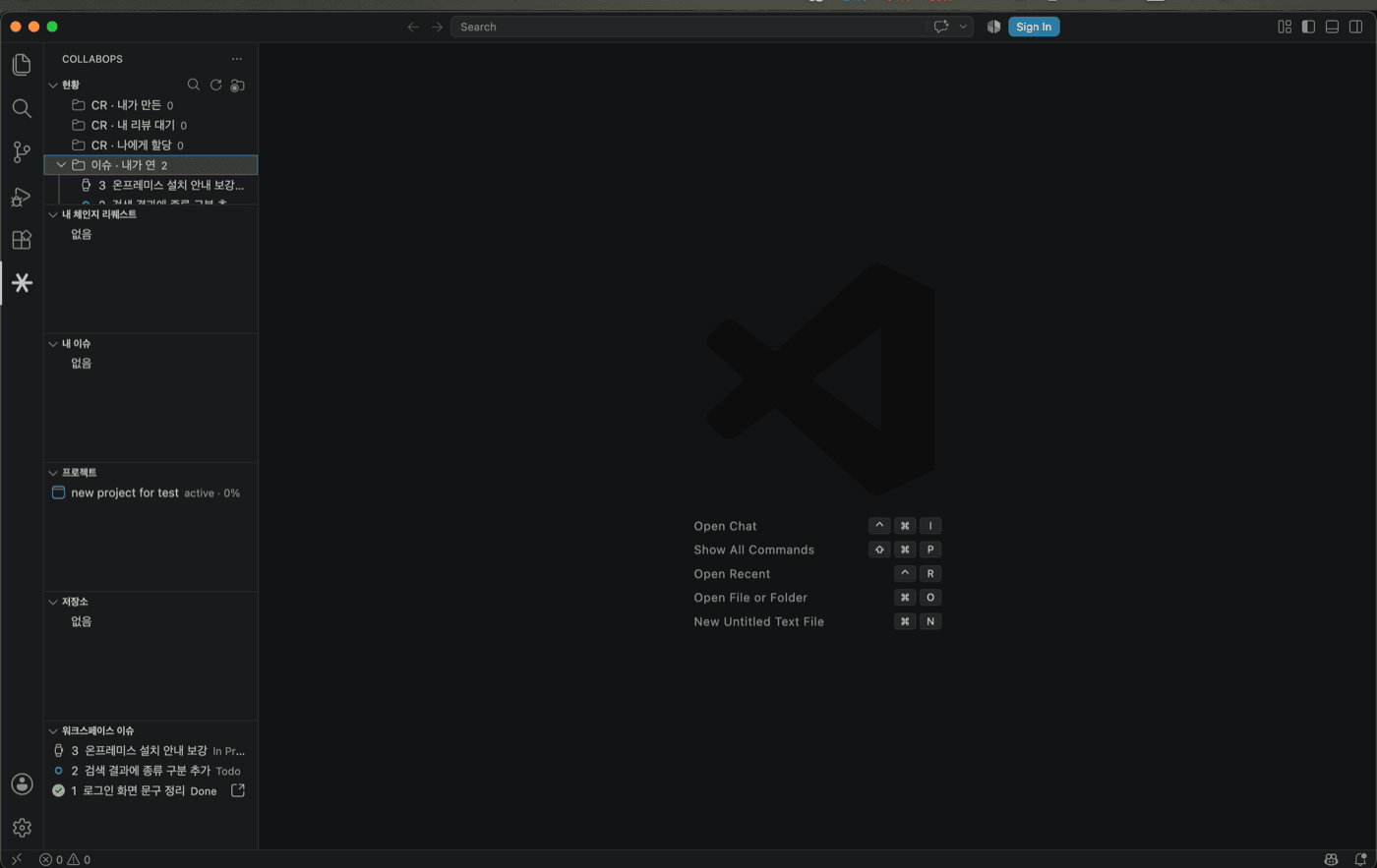
The cost of reading one of them is the same problem. Judging a single change request means looking at the description, the linked issues, the CI results and the activity history — three browser tabs. The extension makes that one document.
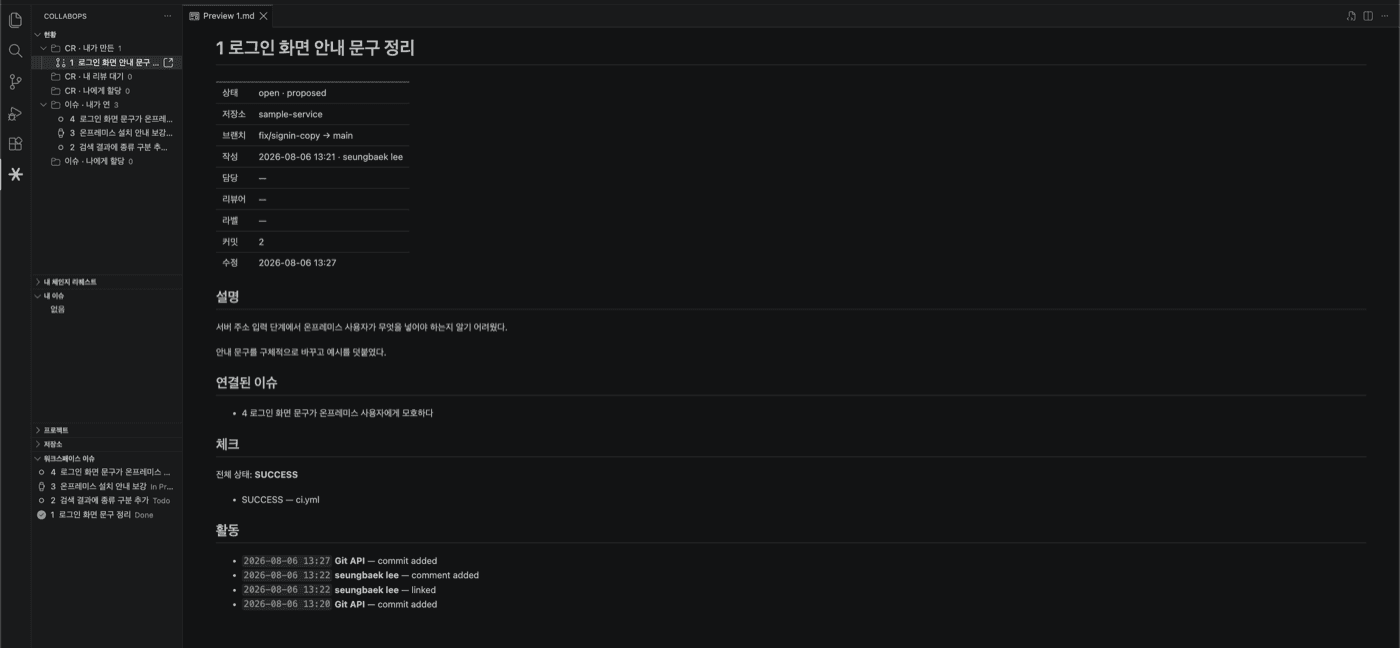
The more change requests agents open, the more this unit cost sets the overall pace. If code production goes up tenfold and human reading speed does not, the extra output only piles up.
Why text instead of a rendered screen
The usual way to draw UI in an extension is a webview. You can put any HTML you want in it — in exchange you mimic the editor theme in CSS and handle light and dark separately.
The CollabOps extension renders detail views as virtual Markdown documents, drawn by the Markdown preview that ships with VS Code. Editing follows the same rule: instead of one input box per field, properties and body open together in a single file, and Cmd+S sends only what changed.
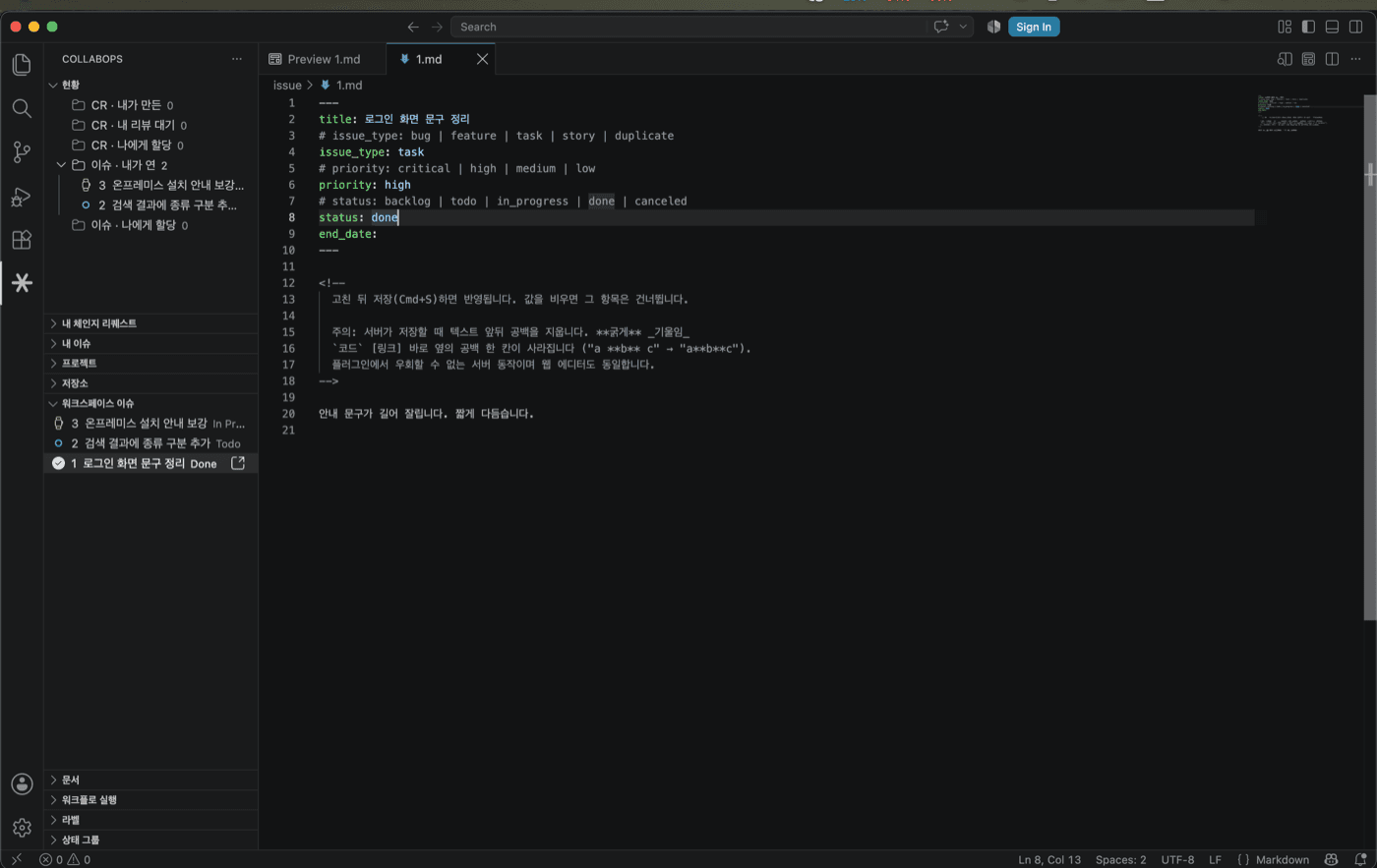
Themes matching automatically and search, copy and undo behaving natively are side effects. The real reason is elsewhere.
When you work alongside agents, text is the shared interface.
An agent's output quality is model capability times context quality. The first term is raised by the model companies; the second is ours. And the person assembling that context is sitting in the editor right now.
If a change request detail is Markdown, the description, the linked issues and the name of the failing check are one block of text. You select it and paste it into a prompt. A screen drawn in a webview exists only for human eyes — you cannot ask it for a summary, or ask whether this CI failure relates to that issue. Every tab you cross retyping things by hand is context lost.
The edit buffer is the same. A form can only be filled by human fingers; a text buffer takes the same shape whether a person writes it or an agent proposes it, and either way the review and the save are a diff.
We did not choose text because rich UI was out of reach. In an environment where people and agents have to read the same thing, text is the wider interface.
We did not put a chat window in it
There are 55 commands in the extension and not one of them is an AI feature. That was deliberate.
The agent is already in the editor. Whether you use Claude Code or Cursor, a chat window from us is a fourth option and usually a worse one than the three you have. Add a tool and the user's first job becomes deciding which one to ask.
A company that builds agent tools and a company that builds the execution layer have different jobs. Ours is to provide state that agents can read, and a screen where people can judge. The MCP server does the first, this extension does the second.
One API, three surfaces
The extension does not wrap the web UI or shell out to a CLI. It calls the same api/v2 the web screens call. Wrapping means inheriting the wrapped thing's assumptions and breaking whenever it changes; calling the same API directly means the extension holds the same permissions and leaves the same audit trail as the web.
Three surfaces sit on top of it today.
| Surface | Used by | For |
|---|---|---|
| Web | People | Line-level review, pipelines, administration |
| IDE extension | People | Reading, editing and approving mid-task |
| MCP server | Agents | Reading and operating on issues, change requests, documents |
Because they share one contract, the state they see does not diverge. While an agent reads an issue and moves its status over MCP, a person sees the same issue in the editor sidebar. There is no question of which one is real.
This is what "state, authority and execution on one plane" looks like in practice. With one plane, surfaces are cheap to add — the next plugin only has to build its own screens.
The faster it gets, the more explicit approval has to be
The extension can run Git commands. It deliberately does not run all of them.
Read-only commands like fetch run straight away. Commands that change the working tree, like checkout or clone, are typed into the integrated terminal and left there. The last Enter is yours. Merging works the same way: the confirmation names the change request and the branch direction so you can read what is about to happen before pressing it.
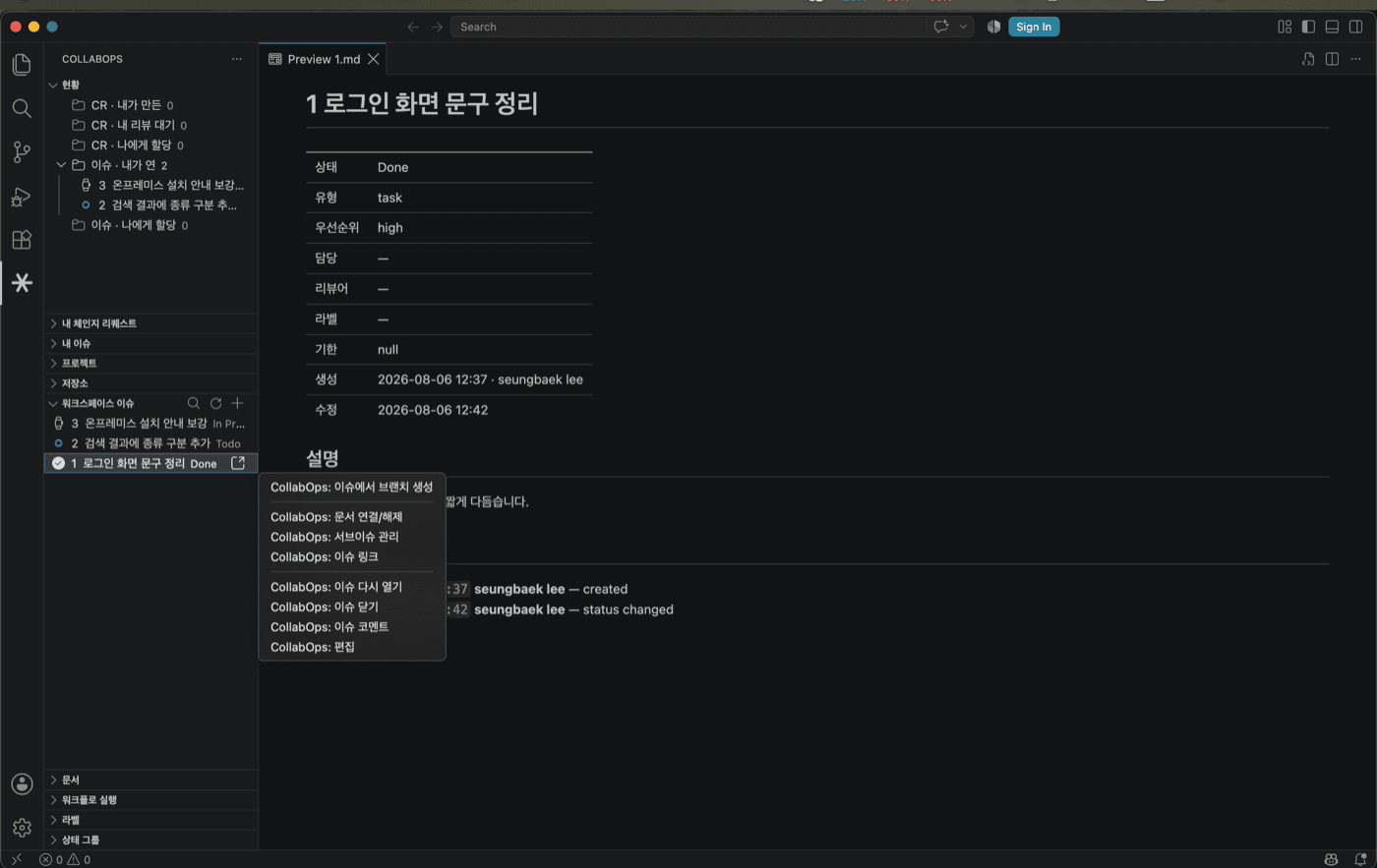
Keeping an extra step in a tool built to save clicks sounds backwards. The reason is that as the total volume of automation grows, where a human intervened has to remain legible. The activity history on a change request records who did what and when, for the same reason. When human edits and automated ones arrive mixed together, that record is the only thing you can retrace later.
It is the same problem as Can agents hold production deploy authority?. The faster the tooling, the sharper the approval points need to be — not the blurrier.
What the web still does better
Line-level review comments and the pipeline view. Putting a diff side by side and commenting on one line wants a wide window and a file tree; pipelines need the logs and the stage graph together before you can judge them. Assignees, labels and permanent deletion also stay on the web for now.
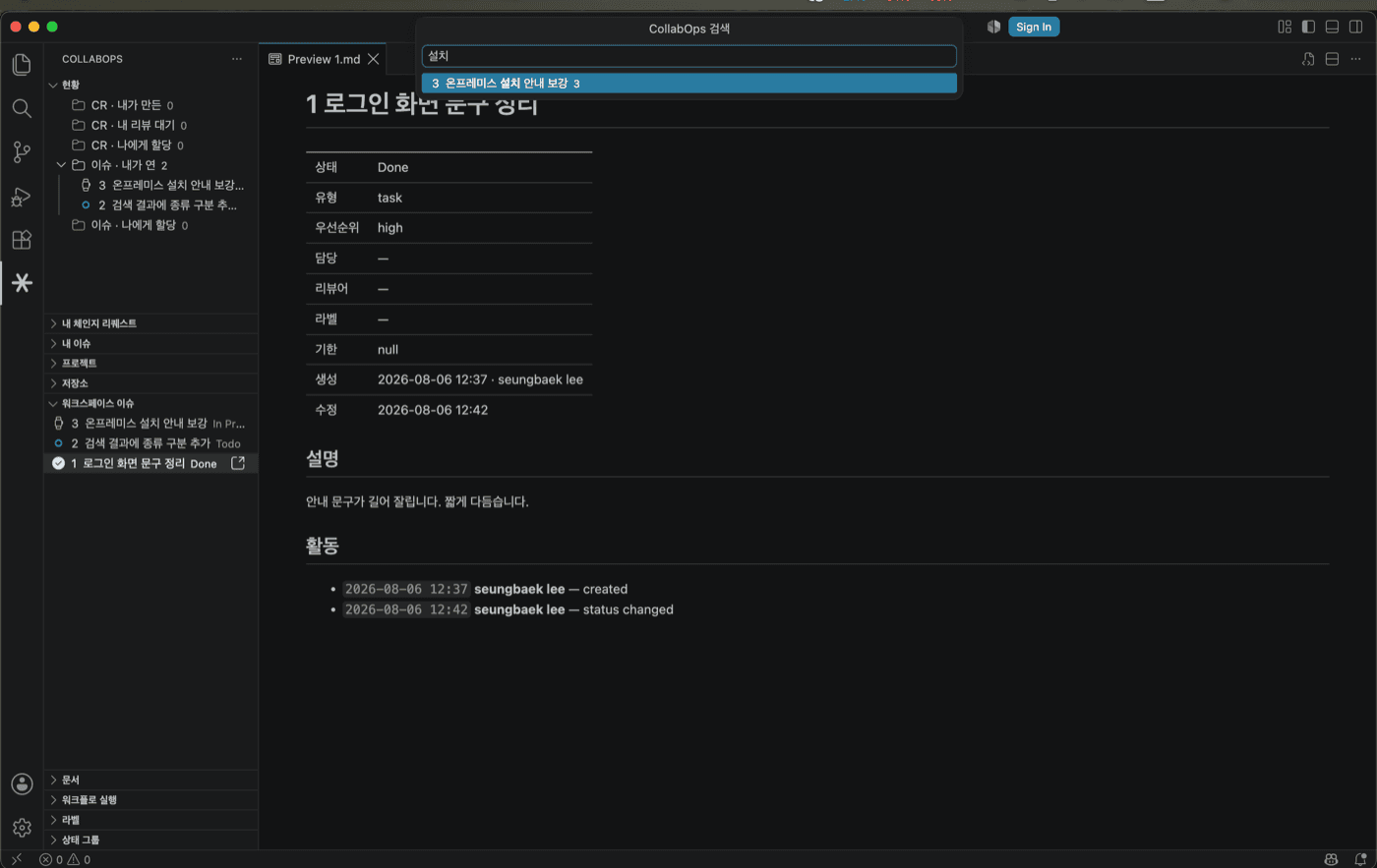
Everything else finishes inside the editor. Cmd+Alt+P searches issues, change requests, documents, projects and repositories at once — pick one, edit it, check the CI results, pull the review branch to read it, and merge.
What about other IDEs?
The Eclipse plugin is already out, and JetBrains and Neovim are in preparation.
The extension is on the Marketplace at its extension page.
Related posts
When a Product Manager Ships Code, Who Owns the Outage?
In organizations where product managers write code with AI and several agents work at once, who checks what before a change reaches production? A role design for verification, approval, and recovery that is independent of the author, grounded in NIST SSDF, SLSA provenance, and the Google SRE postmortem culture.
John Baek
An Eclipse Plugin for the Agent Era — Task Context Was Already the Problem 20 Years Ago
The problem Mylyn set out to solve in the mid-2000s is the agent context problem. What changed is that the thing reading that context is no longer only a person.
Yeongsang Kim
Keep Using Eclipse — Answers on IDE Integration and ITSM Integration
How does this work with Eclipse, and can it integrate with our ITSM — these two questions almost always arrive together. What "standard Git protocol" actually means as an answer, and why the real substance of the ITSM requirement is the evidence chain.
John Baek